
How to Deactivate or Delete Your Snapchat Account (2026 Guide)
If you want to delete your account on Snapchat, here are a few things that you should know about it. Unlike other social media sites, with Snapchat, your account will not be deleted right away. Firstly, it will be deactivated for 30 days and then permanently deleted.
In this guide, you will learn the difference between deactivating and deleting your account, how to delete it on any device, how to download your data before deleting it, and how to reactivate your Snapchat account.
Check: Snapchat Story
Quick Answer
How do you deactivate a Snapchat account?
The way to deactivate a snapchat account is through the Snapchat Accounts Portal by selecting Delete My Account, entering your login credentials, and proceeding. Your account will then be inactive for a total of 30 days before being permanently deleted if not reactivated.
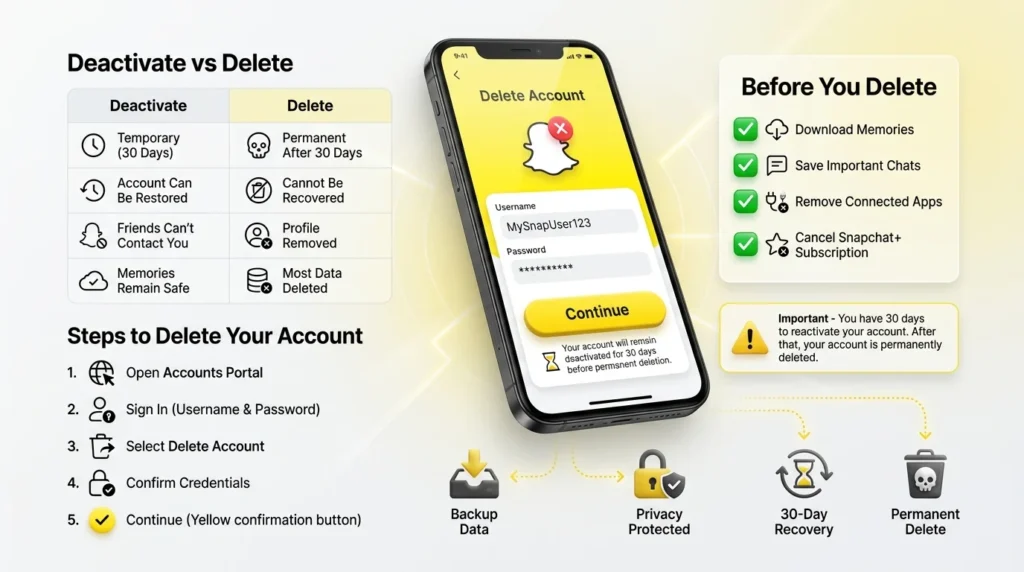
Deactivate vs. Delete Snapchat Account
Although many people use these terms interchangeably, they aren’t exactly the same.
| Feature | Deactivate | Delete |
| Duration | 30 Days | Permanent after 30 days |
| Recoverable | ✅ Yes | ❌ No |
| Profile Visible | ❌ No | ❌ No |
| Friends Can Contact You | ❌ No | ❌ No |
| Memories & Data | Temporarily Stored | Permanently Removed* |
SnapChat will keep limited information for legal, security, or business reasons.
When you delete your account, SnapChat will deactivate your account. It is a temporary status that stays for 30 days, and if you log in again, your account will appear again. But if you do not log in before 30 days, then it will be deleted permanently.
How to Delete Your Snapchat Account
You can delete your Snapchat account using either a web browser or the iPhone app.
Method 1: Deletion via a Web Browser
The method below is suitable for Android, iPhone, Windows, Mac, or tablets.
Step 1
Visit the Snapchat Accounts Portal on a web browser.
Step 2
Log in to your account using your registered email address and password.
If you have forgotten your password, request to reset it.
Step 3
Look for the Delete My Account option.
Step 4
Re-enter your email address and password to confirm your choice.
Step 5
Click Continue.
At this point, your account will be placed in the 30-day deactivation period. If you reactivate the application within 30 days, your data will not be deleted. However, if you do not open your Snapchat account, the company will permanently remove it.
Method 2: Deleting From an iPhone
In case you use an iPhone, you can also initiate the deleting process from your device via the Snapchat app.
- Open the Snapchat app.
- Press your Profile icon.
- Choose the Settings gear icon.
- Inside Settings, scroll down to Account Actions.
- Select Delete Account.
- Follow the prompts.
The procedure might ask you to open a web browser and complete the account deletion via the Snapchat Accounts Portal.
Android users, unfortunately, cannot delete their accounts from the app. You need to use the web browser for that.
Download Your Snapchat Data Before Deleting
Before deleting your account, it is essential to back up your data. This way, you will have access to your valuable information even after the 30-day recovery period.
The data archive contains:
- memories,
- saved photos and videos,
- chats,
- friends,
- login devices,
- account data,
- search history,
- and profile details.
How to Request Your Data
- Log in to the Snapchat Accounts Portal.
- Go to the My Data section.
- Tick the information you want to download.
- Verify your email address.
- Send the request.
Snapchat will send you an email with a link to download the data when it is available.
By downloading this information, you can ensure that you can keep any valuable memories, messages, or account details that you may want to save before permanently deleting your account.
How to Reactivate Your Snapchat Account
Have you changed your mind? With Snapchat, you can reactivate your account within the 30-day period of deactivation.
Steps to Activate
- Open Snapchat.
- Log in with your account credentials.
- Confirm reactivation if necessary.
- Wait for the app to finish restoring your account.
Most accounts are fully restored within several minutes, though Snapchat recommends waiting up to 24 hours for all your friends, Memories, and account settings to appear.
If more than 30 days have passed since you sent the deletion request, unfortunately, your account is gone for good.
Before You Delete Your Snapchat Account
Deleting your account is permanent after the 30-day recovery period, so it’s worth taking a few minutes to prepare.
How to Save Photos and Videos from Snapchat Before Deleting Your Account
Download Your Memories
You can download any photos or videos you want to save before you delete your account.
Save Important Chats
Save any chats or media you might want to keep before you begin deleting your account.
Cancel Snapchat+(If You Subscribe)
If you subscribe to Snapchat+ , you should cancel your subscription in the App Store or Google Play to avoid being billed in the future.
Disconnect Linked Apps
For security reasons, you should disconnect any apps linked to your Snapchat account.
Check Your Email Address
Make sure your email address is correct so that you can access your Snapchat data download, if needed.
Common Problems and Solutions
I Forgot My Password
Make sure you’ve utilized Snapchat’s password recovery tool before trying to delete your account.
I Can’t Find the Delete Option
The delete option might not be in the mobile application; instead, use the Accounts portal on the web browser.
My Account Isn’t Reactivating
The reactivate button will appear within 24 hours of logging in. However, if your account has been inactive for more than 30 days, you can’t reactivate it.
Frequently Asked Questions
Can I delete my Snapchat account temporarily?
When you apply for deletion, your account will be inactive for 30 days before permanent deletion. You can reactivate the account by signing in with your credentials before its deletion.
Does Snapchat delete my account right away?
The process usually begins with your account being deleted 30 days after deactivating it. However, you can avoid permanent deletion by signing in with your credentials.
Can I delete my Snapchat account on Android?
Yes, you can. However, you need to delete it using the Snapchat Accounts Portal from any android web browser.
Does Snapchat tell my friends that I deleted my account?
It does not notify your friends that you deleted the app. However, your account status will appear inactive to them.